


Property management financial statements show you exactly where your money is going. Get these statements right and you’ll catch problems early, answer fewer owner questions, and make faster, smarter decisions about your portfolio.
Start your 14-day Free Trial Today!
It takes just 30 seconds. No credit card required. Use sample data to see how Buildium handles your real-world tasks.
This post walks through the core statements, a step-by-step process for generating them each month, and how to read the numbers to guide your decisions.
What We’ll Cover:
- The core financial statements every property manager should produce
- A step-by-step process for generating them each month
- How to read the numbers and turn them into decisions
- Common reporting mistakes and how to avoid them
What Are Property Management Financial Statements?
Property management financial statements are regular summaries of the income, expenses, and financial health of the properties you manage. You use them for two jobs, reporting to owners and making decisions about the properties in your portfolio. Most property managers produce them monthly, with some owners preferring a quarterly recap on top of that.
Accurate reporting also protects your owner relationships. Owners consistently rank clear, straightforward reporting among the top things they want from a property manager, according to thw 2026 Property Management Industry Report. When your statements are clean and on time, owners ask fewer questions, trust your numbers, and stay with you longer.
The Core Financial Statements Every Property Manager Needs
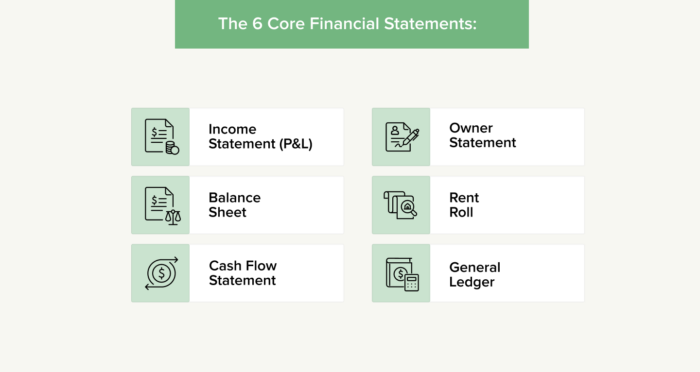
Most property management reporting comes down to six statements. Each one answers a different question about a property or your business, so together they give owners and you the full picture.
1. The Income Statement (Profit and Loss)
The income statement, also called the profit and loss statement or P&L, shows revenue and expenses over a set period such as a month or a year. It lists rental income and other revenue at the top, operating expenses below, and net income at the bottom. This is the report owners look at first, because it tells them whether their property made money over the period.
2. The Balance Sheet
The balance sheet shows what a property or business owns and owes at a single point in time. It has three parts. Assets are what the property owns, liabilities are what it owes, and owner’s equity is the difference between them. Reviewing it tells you how much is held in reserves and what obligations are outstanding, which helps you plan for large repairs and other upcoming costs.
3. The Cash Flow Statement
The cash flow statement tracks the money moving in and out over a period. It separates cash from operating activities, such as rent collected and bills paid, from other movements such as owner contributions and draws. This report tells you whether a property has enough cash on hand to cover its bills, which is the difference between a property that looks profitable on paper and one that can actually pay its vendors on time.
4. The Owner Statement
The owner statement is the owner-facing summary you send each period. It typically shows the income collected, the expenses paid on the owner’s behalf, and the net distribution or draw after management fees and any reserves withheld. A clear owner statement answers most of the questions an owner would otherwise email you about, which saves you back-and-forth every month.
5. The Rent Roll
The rent roll lists every unit in a property along with its lease terms, rent amount, payment status, and occupancy. It gives you a quick read on which units are occupied, which leases are ending soon, and where rent is behind. That makes it the first place to look when you want to spot occupancy gaps or collection problems before they grow.
6. General Ledger
The general ledger is the complete, chronological record of every transaction, organized by the categories in your chart of accounts. Every other statement pulls from it. When a number on the income statement or owner statement looks off, the general ledger is where you trace it back to the individual transaction.
How to Generate Property Management Financial Statements, Step by Step
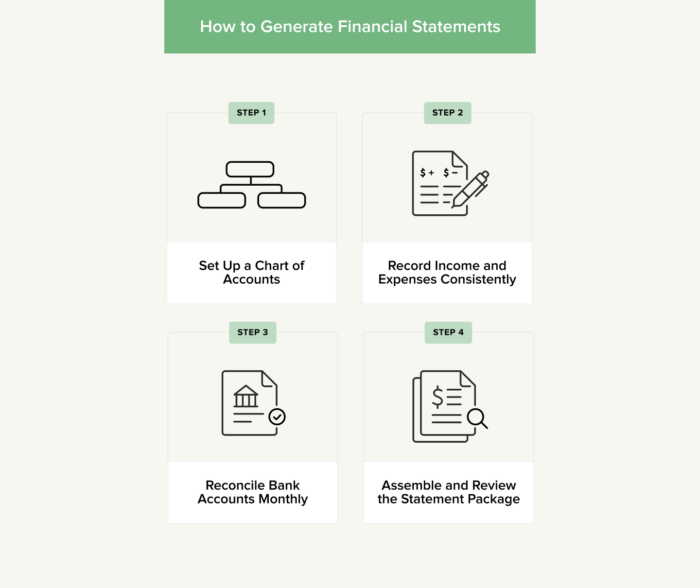
You can produce these statements in a spreadsheet or in property management accounting software. The process is the same either way. Follow these four steps each month and the statements largely build themselves from the records you keep.
1. Set Up a Chart of Accounts
Your chart of accounts is the list of categories you use to sort every dollar of income and expense, such as rent income, repairs, and management fees. Set it up once and use the same categories every month. Consistent categorization is what lets you compare one month to the next and produce reports that read the same way each time.
2. Record Income and Expenses Consistently
Log every transaction as it happens, including rent payments, owner draws, and vendor bills. Keep each owner’s funds separate from your operating money and from other owners’ funds, so the reports for one property never blend into another. Recording transactions promptly, rather than in a rush at month-end, keeps your books accurate and your monthly close short.
3. Reconcile Bank Accounts Monthly
Reconciliation means matching your recorded transactions against your bank statement to confirm the two agree. Do this every month for each account you manage. It catches missing entries, duplicate charges, and data-entry errors before they reach an owner statement, which is what keeps your reporting trustworthy.
4. Assemble and Review the Statement Package
Once your books are reconciled, pull the reports together into a package for each owner. Review the income statement, owner statement, and rent roll for anything that looks unusual before you send anything out. A quick review step catches the errors that erode owner trust, and it takes far less time than correcting a statement after an owner has already seen it.
How to Generate Financial Statements in Buildium
Buildium is purpose-built property management accounting software, so the reporting steps above happen inside one platform instead of across spreadsheets. Here is how the workflow maps to the software.
- Generate reports in a few clicks. You can produce balance sheets, income statements, cash flow statements, and bank reconciliations from your ledger, so you spend less time assembling reports by hand each month.
- Deliver owner statements automatically. Owners see their statements in the owner portal on a schedule you set, which cuts down the emails and phone calls asking where their numbers are.
- Save report packages as templates. You can save a batch of reports and re-run the same package every month, so your close follows the same routine instead of starting from scratch.
- Reconcile with automated matching. Buildium scans your bank statements and matches transactions to entries in your ledger, so reconciliation takes less manual work and your books stay current.
For a company-wide view of your own business finances, Buildium’s company financials reports cover your balance sheet, income statement, and cash flow alongside the property-level reporting you send to owners.
How to Read and Use Your Financial Statements
Producing the statements is only half the job. The value comes from reading them and acting on what they tell you.
- Net income and net operating income (NOI). Look at the income statement for profitability. If net operating income is slipping, compare expense categories month over month to find where costs are climbing.
- Cash flow. A property can show a profit and still run short on cash. When the cash flow statement tightens, review the timing of large expenses and reserve levels before a bill comes due.
- Rent roll. Use it to track occupancy and past-due balances. Rising arrears or an approaching lease expiration is a signal to follow up on collections or start renewal conversations early.
- Balance sheet. Check reserve balances against upcoming repairs and capital projects. If reserves are thin, you can flag it to the owner well before the work is needed.
Reading the numbers this way turns your monthly reporting into a set of decisions about pricing, spending, and owner communication.
Common Financial Reporting Mistakes to Avoid
A few mistakes come up again and again, and each one is straightforward to prevent.
- Mixing personal, operating, and owner funds. Blending money across accounts makes reports inaccurate and creates trust-accounting problems. Keep separate accounts and records for each owner.
- Skipping monthly reconciliation. Errors compound when you let them sit. Reconcile every account each month so small discrepancies do not become large ones.
- Categorizing inconsistently. When the same expense lands in different categories from month to month, your reports stop being comparable. Stick to one chart of accounts.
- Delivering statements late or unclearly. Owners notice when reports are late or hard to read. A predictable delivery date and a clean format keep owners confident in your work.
Accounting and trust-accounting rules can vary by location, so it’s a good idea to consult with a qualified accounting professional if you’re unsure how a rule applies to your business.
Make Financial Reporting a Monthly Habit
Reliable financial statements come from a steady monthly routine, not a scramble at close. When you keep clean records, reconcile every account, and deliver a consistent package, the reports become a natural output of the work you already do.
A few points to keep in mind:
- The six core statements are the income statement, balance sheet, cash flow statement, owner statement, rent roll, and general ledger.
- A consistent chart of accounts and monthly reconciliation are what make accurate statements possible.
- Reading the numbers, not just producing them, is where reporting pays off in better decisions.
- On-time, clear owner statements build the trust that keeps owners with you.
If you’re ready to put this into practice, Buildium’s accounting and reporting features can help you produce owner-ready statements with less manual work. You can give the platform a try with a 14-day free trial or by signing up for a live, guided demo.
Frequently Asked Questions
What Are the Key Financial Reports for Property Managers?
The core reports are the income statement (profit and loss), balance sheet, cash flow statement, owner statement, rent roll, and general ledger. Together they show profitability, financial position, cash movement, and unit-level status for the properties you manage.
What Should Be Included in a Monthly Financial Report?
A monthly package usually includes an income statement, an owner statement showing income collected and expenses paid, and a rent roll with payment status. Many property managers add a cash flow summary and notes on any large or unusual expenses.
How Often Should Property Managers Produce Financial Statements?
Monthly is the standard cadence for owner reporting, since it keeps owners current and lets you catch issues early. Some owners also want a quarterly or annual summary for a longer-term view.
What’s the Difference Between an Owner Statement and a Financial Statement?
A financial statement is any report on a property’s or business’s finances, such as an income statement or balance sheet. An owner statement is one specific, owner-facing report that summarizes the income collected, the expenses paid, and the net amount distributed to that owner for the period.