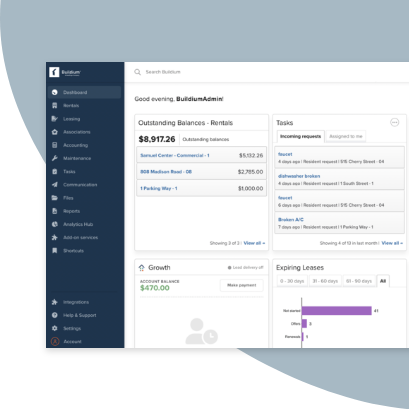
If you’ve been exploring property management software, you’ve probably come across both Buildium® and DoorLoop®. While both platforms are well known, each has its own strengths and focus.
In this detailed comparison, we’ll take a closer look at each platform’s pricing, features, and overall capabilities to help you decide which one can best support your operations. This side-by-side breakdown will give you the details you need to find the software that fits your goals, team, tenants, and more.
Buildium at a Glance
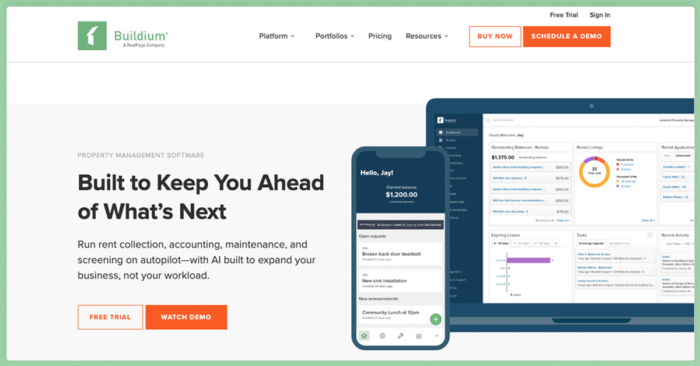
Serving property managers across the U.S. and Canada, Buildium is a unified platform purpose-built for both property and community association management. It’s designed to handle nearly every aspect of your day-to-day work in one intuitive dashboard.
What sets Buildium apart is its impressive collection of features designed for ease of use and flexibility. Whether you manage single-family homes, multifamily units, HOAs, or a mix of different property types, Buildium gives you powerful tools to help you scale on your terms.
Some of Buildium’s most advanced and useful capabilities include:
- enhanced automation that runs reliably in the background to save you time on burdensome, repetitive operations
- intuitive, agentic AI, that acts like a member of your team, serving up smart communications, spotting risks and patterns in your performance, and coordinating high-volume tasks
- flexible customization for workflows, reports, messaging, and more that makes the software highly adaptable to your evolving business needs
Features
Buildium has a full suite of features built to support your operations and long-term growth, including:
- A Resident Center, complete with a mobile app, where tenants and homeowners can make payments, submit maintenance requests, and communicate directly with your team.
- Customizable fields, templates, dashboards, and reports to meet the specific needs of your business, residents, and clients, while saving you time on repetitive tasks.
- A complete maintenance management system, including work order creation, real-time tracking, project-level management, and vendor coordination.
- Automated electronic payments for rent, association dues, and fees, plus robust accounting tools with built-in 1099 eFiling.
- Comprehensive analytics and reporting through Buildium’s Analytics Hub, giving you insights into performance, revenue, and leasing activity.
- Association management tools for violations tracking, architectural reviews, and board communications—all accessible from one platform.
- Mobile apps for both managers and residents, enabling you to oversee your portfolio from anywhere.
- Extensive support and onboarding resources including a U.S.-based support team accessible through live chat and email, live phone support, structured onboarding programs, and an in-depth knowledge base and user forum.
- Marketing and leasing tools such as free property websites, online rental applications, tenant screening, and eSignatures for faster lease signing.
- Lumina AI, a collection of tools powered by agentic AI that feels like having more hands to support routine tasks such as tenant communication, maintenance coordination.
- Workflow Automations that trigger approvals and updates automatically, reducing delays and human error.
If there’s a feature you need that Buildium doesn’t offer natively, chances are you’ll find it in the Buildium Marketplace—an ecosystem of integrated apps that extend your capabilities without requiring multiple logins or complex setup. And for teams that want even more flexibility, Buildium’s Open API provides the ability to create custom data workflows and automations.
DoorLoop at a Glance
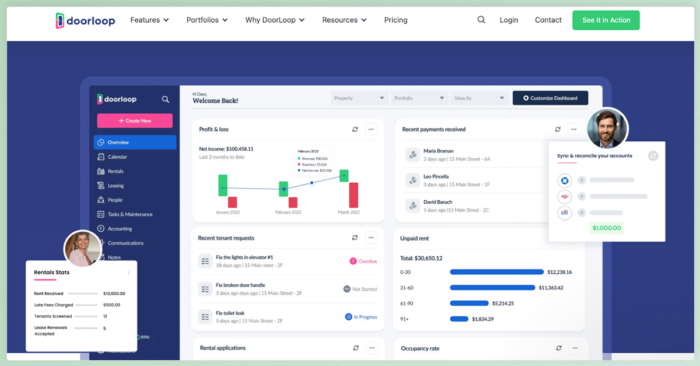
DoorLoop is a cloud-based property management software built primarily for residential and mixed-use portfolios to manage properties, tenants, and payments.
Features include:
- Accounting and financial reporting
- CRM for prospects and leads
- Maintenance request management
- eSignatures
- Tenant and owner portals
- QuickBooksⓇ Online sync (Pro and above)
- ZapierⓇ integrations
- Renters insurance
- AI assistant (Looper AI)
- Customizable fields
The platform also has core association management functionality.
DoorLoop vs Buildium: Features to Look For
As a starting point, property management software should have features in each of these important areas:
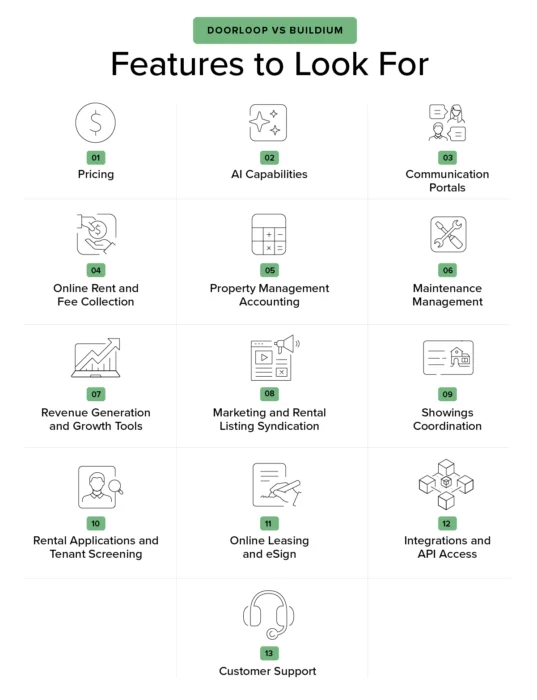
- AI Capabilities
- Communication
- Online Rent and Fee Collection
- Accounting
- Maintenance
- Revenue Generation and Growth
- Property Marketing and Listing
- Showings Coordination
- Online Leasing
- Integrations and API Access
- Customer Support
Buildium and DoorLoop offer features that fall into all of these categories, but the extent of their effectiveness can vary. Here’s a head-to-head comparison of the most important capabilities.
DoorLoop vs Buildium: Pricing
General pricing comparisons of the two platforms can be difficult, considering each has its own pricing structure.
Buildium Pricing
Buildium’s Essential plan starts at $62 per month, with a maximum of 150 units. You’ll get access to important features, such as accounting, maintenance, tasks and violations, online portals, and resident and board member communications.
The Growth plan starts at $192 per month and comes with free property inspections and access to Analytics & Insights—which include measurement tools for payments, resident activities, the leasing cycle, and other details on your company’s revenue streams. You’ll also get unlimited eSignatures for leasing.
The Premium plan starts at $400, comes with all the perks of the Growth plan and gives you access to Buildium’s Open API along with a dedicated growth consultant to help you find and cultivate new leads. It also includes access to integrations with Marketplace Premium partners at no extra cost.
For each plan, prices per unit drop as your unit count increases and if you opt to pay annually. Every plan also gives you access to partner integrations through the Buildium Marketplace. You can use Buildium’s pricing calculator for the best cost estimate, given your door count and preferred tier.
| Plan | Starting Price | Key Features |
| Essential | $62/mo (up to 150 units) |
|
| Growth | $192/mo |
|
| Premium | $400/mo |
|
DoorLoop Pricing
DoorLoop’s Starter plan begins at $69 per month (usage-based). It includes essentials such as online rent and fee payments, a tenant portal, maintenance management, two-way communication, accounting and reporting, rental applications and screening, lease management, CashPaymentsⓇ powered by Western UnionⓇ, eSignature, and a basic tenant CRM.
You can upgrade to DoorLoop’s Pro plan at $149 per month, which adds QuickBooks Online sync (one-way), customizable dashboards, owner portal, user access roles, tenant announcements, advertising tools, and expanded support channels (email, chat, phone, ZoomⓇ), alongside the Starter features.
At the top tier, DoorLoop’s Premium plan is $209 per month and includes everything in Pro plus integrations and API access, website portal integration, free incoming ACH payments, and VIP-style priority support.
You can find a thorough breakdown of each DoorLoop plan on its pricing page.
| Plan | Starting Price | Key Features |
| Starter | $69/mo (usage-based) |
|
| Pro | $149/mo |
|
| Premium | $209/mo |
|
DoorLoop vs Buildium: AI Capabilities
Some platforms use the term AI to describe automating individual tasks or introducing small shortcuts. Others use AI to power entire workflows that speed up your most important operations and support faster, smarter decision-making. Understanding the difference can have a major impact on your day-to-day work and long-term scalability.
Buildium’s AI Tools
Buildium’s AI capabilities are built into the platform through Lumina AI®, a collection of intuitive tools and agents that help property managers do more with less:
- AI Assistant surfaces real-time guidance, help articles, and step-by-step walkthroughs based on what the user is doing in the product.
- For Premium users, AI Bill Scan extracts data from uploaded invoices to create ready-to-review draft bills in seconds.
- For Growth and Premium Users, Write with AI helps users generate resident messages, announcements, and emails quickly, with adjustable tone and translation options
But Buildium goes further with the Lumina AI Workforce, a set of AI agents designed to take on high-friction tasks behind the scenes.
For example, the Leasing Agent can delist a unit and update applicant statuses automatically when a lease is signed. Unlike traditional automation, these agents don’t require users to build complex workflows. They can operate based on context and intent.
Using AI in this way boosts how quickly you can move from lead to lease and make a difference on time-sensitive parts of the leasing lifecycle. For example, with Builidum’s leasing agent you can speed up the processing time for turnovers by 80%.
DoorLoop’s AI Tools
DoorLoop includes an AI Assistant available to Pro and Premium users as an add on (25% of your prescription for the Pro Plan and 15% for the Premium plan). It can help with tasks like writing listing descriptions, summarizing reports, and replying to resident messages. The assistant performs tasks such as creating a maintenance task, composing a message, or providing a summary.
DoorLoop vs Buildium: Communication Portals
Both Buildium and DoorLoop include built-in communication tools that organize all your interactions with residents, owners, and vendors in one place.
Buildium Portals
Buildium provides access to separate, dedicated portals for Residents, Owners and property management staff, either on their mobile device or on the web.
- A Resident Center with mobile app access that gives tenants and homeowners the ability to make payments, submit and track maintenance requests, and access important documents anytime and lets managers send community-wide messages anytime.
- An Owner Portal where property owners can track investments and financial performance, view real-time profit-and-loss statements, contribution and draw histories, and transaction details without having to request reports manually.
- Association management support with violation tracking and architectural requests directly in the mobile app.
DoorLoop Portals
Doorloop provides a single app for residents, owners, and property managers to access via their own login. Residents can pay rent, submit maintenance requests, and review basic documents. Owners can see income and expense summaries and access select reports, depending on their plan tier. Property managers can view financials, see rent ledgers and view documents.
DoorLoop vs Buildium: Online Rent and Fee Collection
Buildium Online Rent and Fee Collection
Buildium’s ePay lets managers collect rent and other payments entirely online. With ePay:
- Residents can pay by ACH, credit card, or debit card directly through the Resident Center or mobile app.
- Property managers can automate rent reminders, recurring payments, and late fee assessments.
- Payments are deposited directly into designated accounts, and the entire process is linked to Buildium’s accounting system.
- Association managers can use Buildium’s payment tools for dues and fee collection, helping boards maintain consistent cash flow and clear reporting.
Flexible payment options are also easy with a built-in integration with Livble®, a service that lets tenants split their rent into smaller, manageable installments. The service pays property managers the full rent up front while handling all the rest, including installment tracking, collections, and communication.
Buildium is a payment facilitator, meaning it can handle the entire payment experience (including underwriting and approvals) in house and provide front line support to customers.
DoorLoop Rent and Fee Collection
DoorLoop includes online rent payment options across all tiers, allowing tenants to pay electronically and set up recurring charges. However, payments to vendors or owners via ACH bank transfers are only available in the Pro and Premium plans.
While DoorLoop supports automated late fees and partial payment tracking with transactions that sync one way from Doorloop’s platform to Quickbooks Online.
DoorLoop vs Buildium: Property Management Accounting
Effective accounting goes beyond just monitoring payments. You need to keep tabs on the various contracts, services, expenses, and taxes that determine your bottom line, as well. Here’s how each platform handles those tasks.
Property Management Accounting in Buildium
Buildium includes comprehensive accounting tools that record every fee, deposit, and refund from residents and association members in a unified dashboard. It also tracks and lets you manage every charge in a chart of accounts, to help you avoid missing payments. With Buildium, you can:
- Use built-in calculators to determine how much you owe rental owners and vendors, and how much to collect for your property management company.
- Manage all your work orders in one place and convert them into bills that are easily payable online, with configurable rules for approvals on both accounts payable and outgoing electronic payments
- Generate financial reports for your own business and to share with owners and association boards
- Reconcile your bank accounts automatically, make informed budgeting and forecasting decisions, and stay compliant with trust accounting regulations
- Record transactions for individual units to facilitate more insightful reporting and eliminate the need for time-consuming manual calculations
Even before tax season rolls around, Buildium’s e-Filing tools can verify your tax numbers and prep for filing. Once filing opens, you can e-File your 1099-MISCs and 1099-NECs through Buildium, creating forms online, postmarking them, and sharing them with owners and vendors, all in the same day.
AI Enhancement: Buildium’s AI Bill Scan feature allows users to upload and scan multiple invoice files at once, automatically extracting key billing details (dates, vendors, allocations, line items). The feature then generates draft bills for review, approval, and payment. All together, this can cut invoice processing time by up to 40%.
Property Management Accounting in DoorLoop
DoorLoop provides general accounting tools that cover fiduciary tasks. Its QuickBooks Online sync (available with the Pro plan and above) allows managers to export transactions to QuickBooks, but the integration is one-way only. That means updates made in QuickBooks don’t automatically sync back into DoorLoop.
DoorLoop’s financial reports include standard ledgers and profit-and-loss summaries. Additionally, DoorLoop does not include built-in 1099 e-Filing, requiring users to handle those processes manually or through third-party tools.
DoorLoop vs Buildium: Maintenance Management
Property managers who are vigilant about maintenance and resolve repair requests quickly earn the trust of their clients and the loyalty of their residents. They also avoid the mounting costs of neglected repairs.
Buildium’s Maintenance Management
With Buildium’s maintenance features:
- Enable tenants, owners, and staff to submit work order requests easily on any device, with notes, images, and videos to give vendors a complete picture of the issue.
- Create a work order directly from the request using stored vendor contact information in Buildium.
- Schedule regular upkeep or recurring maintenance tasks to trigger automatically with alerts and vendor notifications.
- Assign and track every work order and process vendor payments directly through Buildium’s accounting tools.
- Set up custom workflows that complete even more tasks based on certain triggers such as setting up a to-do task to change the door code or creating a unit turnover maintenance project upon a tenant completing their move-out process.
Buildium’s Maintenance Contact Center offers an added layer of support. For a small per-unit fee, a dedicated 24/7 call center answers maintenance calls, prioritizes emergencies, and keeps detailed logs of every request—all while maintaining full visibility for managers inside Buildium.
AI Enhancement: Lumina AI Maintenance Agent can classify incoming requests by urgency and make vendor routing suggestions. It also spots common issues in work order requests and can offer guidance to residents to resolve the issue themselves or send tasks with actionable information to your team.
DoorLoop’s Maintenance Management
DoorLoop offers work order tracking within its platform. Tenants can submit maintenance requests, include notes and attachments, and check on their progress through the tenant portal. Managers can view and assign requests to vendors, then mark them as complete when finished.
However, there’s no integrated call center for handling emergency requests.
DoorLoop vs Buildium: Revenue Generation and Growth Tools
The best property management software combines tools to help you grow your portfolio with other ways to tap into new income opportunities and deliver services residents and owners are happy to pay for.
Buildium’s Growth Tools
Buildium is designed with growth in mind, giving property and association managers several ways to expand their portfolios while bringing in additional revenue while strengthening resident satisfaction. Here are some of the ways the platform helps you grow:
- All Property Management (APM), a built-in lead generation network that matches managers with owners actively searching for management services.
- Analytics and Insights features you can collect real-time data on key performance metrics, such as revenue, leasing performance, expenses, work order completion times, and more. You can also get a snapshot of how your portfolio is performing against competitors. You can view these insights in a clear dashboard and share them as custom reports with staff and clients.
- Deep customization through custom fields, forms, and open API access. Users can refine the tools they’re already familiar with to reflect evolving, more complex operations and stay efficient.
- An extensive and growing Marketplace of partner integrations to track business performance and make decisions to improve your bottom line, take on new doors, expand into new markets, and even put entire marketing strategies into action. You can learn more about these tools in our dedicated guide here.
DoorLoop’s Growth Tools
DoorLoop gives managers access to reports with details such as income, cash flows, delinquencies, profit-and-loss statements, and more. These can be sorted through or customized using the platform’s built-in tools which also includes an AI assistant to help you get the numbers you need.
These insights can help with your growth planning and, when it comes time to share reports with stakeholders, you can export them to Excel, PDF, or Quickbooks without extra work.
DoorLoop vs Buildium: Showings Coordination
Coordinating property showings efficiently is an important part of keeping vacancies low and leasing activity consistent. Both Buildium and DoorLoop support showing coordination in slightly different ways.
Showings Coordination With Buildium
Buildium integrates directly with Tenant Turner® to power its Showings Coordinator service, an optional add-on that automates nearly every part of the showing process:
- Prospective renters can schedule showings online, complete pre-qualification steps, and receive automated confirmations and reminders.
- Showings Coordinator supports both in-person and self-guided showings, helping property managers save time while keeping prospects engaged.
- Appointments and prospect data syncs within Buildium automatically, so staff always have an accurate view of upcoming tours.
- vacancy metrics and showing performance can be viewed in the same dashboard.
For even greater flexibility, Buildium connects to ShowingHero® through the Buildium Marketplace. ShowingHero centralizes lead communications, call tracking, and follow-up, giving managers additional visibility into leasing activity and lead conversion.
Showings Coordination with DoorLoop
DoorLoop provides a calendar-based showing management tool that allows prospects to request tour times and for managers to confirm appointments. Managers can record showing details and track which units have upcoming visits directly from the DoorLoop dashboard.
DoorLoop vs Buildium: Rental Applications and Tenant Screening
oth Buildium and DoorLoop make it possible to manage applications and screenings online, though Buildium’s tools go further in automation and customization.
Buildium’s Application and Screening Tools
Buildium supports the application and screening process with:
- free customizable online applications with every plan, with custom fields to meet property-specific requirements and link applications directly from their property listings or website.
- an applicant dashboard, that each submitted application automatically populates, allowing you to review and compare candidates at a glance.
- leasing workflow automations that move applications through defined stages—received, under review, and approved—with automatic status updates to applicants.
- an integrated screening service, powered by TransUnionⓇ that runs background and credit checks upon request.
Screenings cost $35 when billed to the applicant, but Buildium users receive a discounted rate of $17 when billed through their Buildium account. There’s also an Enhanced Screening option for $20 that accounts for cosigner information and provides a data-based recommendation without requiring extra input from the applicant.
DoorLoop’s Application and Screening Tools
DoorLoop also offers digital applications that and background checks that can be run directly from the platform. Property managers can customize applications with property details, and applicants can submit documents or IDs online. Its screening feature provides credit and background reports, with pricing that varies based on the plan tier and add-ons selected.
DoorLoop vs Buildium: Online Leasing and eSign
Buildium’s Leasing and eSign Tools
Once an applicant is approved, getting a lease signed quickly is critical to securing occupancy and reducing downtime. Buildium’s online leasing features include:
- customizable templates for every type of lease document, complete with more than 50 autofill fields and the ability to add your own clauses or addenda.
- secure document sharing and signing through Dropbox SignⓇ, giving both property managers and residents the convenience of completing paperwork from any device.
- automated reminders and status updates to keep everyone informed throughout the leasing process. Lease renewals can be handled in the same dashboard with just a few clicks, keeping your team organized and consistent.
- flexible security deposit options through partnerships with MSIⓇ and ObligoⓇ, giving residents an easier move-in experience and helping managers stay compliant while adding potential new revenue streams.
- Lumina AI Leasing Agent that supports Premium users by scanning lease agreements for important details and taking units off the market automatically.
AI Enhancement: Buildium’s AI Leasing Agent, part of Lumina AI Workforce, can delist units automatically when they’re rented and update applicant statuses based on their interactions, all without manual intervention.
DoorLoop’s Leasing and eSign Tools
DoorLoop allows property managers to upload, send, and electronically sign lease documents, as well. Each plan includes access to its built-in eSignature tool, but usage limits apply on the lower tiers.
Managers can customize lease templates and store them for reuse, though automation options—such as renewal reminders or lease tracking—are more limited. DoorLoop also provides renters insurance options and has an integration with Zapier. However, there are fewer built-in integrations for flexible deposit programs or compliance management than what Buildium’s Marketplace offers.
DoorLoop vs Buildium: Integrations and API Access
Whether you’re connecting accounting tools, marketing platforms, or inspection apps, the ability to integrate with other systems can make or break your efficiency.
Buildium Integrations and Open API
Buildium’s Marketplace is home to a growing network of partner integrations that help managers customize their workflows without leaving the platform. These integrations cover everything from leasing and marketing to accounting, communications, and inspections.
Popular partners include HappyCo® for property inspections, LeadSimple® for sales and workflow automation, Tenant Turner for showings, and Upkeep Media® for marketing.
Managers can activate integrations from within the Buildium dashboard and sync data between systems immediately without any custom setup.
Buildium’s Premium plan also unlocks access to its Open API, which allows teams to build custom data connections, automate repetitive tasks, and connect proprietary tools or third-party systems.
This open ecosystem gives property managers the flexibility to choose how they run their business. Whether you rely on one or many third-party apps, Buildium’s integrations help your systems work together seamlessly.
DoorLoop Integrations and Open API
DoorLoop connects to other platforms through Zapier, enabling data connections between select apps. It also has partner integrations with companies such as TransUnion and offers direct integrations with QuickBooks Online, although the sync is one-directional (from DoorLoop to QuickBooks only).
More advanced integrations, such as API access, website portal embedding, and custom data workflows, are limited to DoorLoop’s Premium plan. The available partner network is smaller.
DoorLoop vs Buildium: Customer Support
Buildium’s Customer Support
Buildium’s support team is well-known across the industry for its responsiveness and accessibility. The platform’s resources have a proven track record with 85% of customer requests being resolved on the first call. The platform’s support includes:
- access to a U.S.-based support team via live chat, and email (all plans). Email tickets are typically answered within 24 hours, and live agents are available during business hours for immediate assistance.
- live phone support (growth and premium plans).
- structured onboarding programs designed to help new users hit the ground running.
- a dedicated growth consultant for personalized guidance on setup, workflow optimization, and ongoing strategy (Premium plan).
- an extensive Knowledge Base and User Forum allow managers to find quick answers, connect with peers, and stay informed on best practices.
- webinars and product training sessions to help use the platform to its full extent.
DoorLoop’s Customer Support
DoorLoop offers support through free live chat, email, and phone, but the level of assistance varies by plan. All plans receive live chat free. They have free onboarding training and webinars, as well. Premium customers receive VIP Priority Support, which includes faster response times and dedicated representatives.
However, beyond initial onboarding calls, customers on lower tiers rely primarily on in-app and email support, along with a toll-free 888 phone line. Zoom support becomes available at the Pro Tier. DoorLoop also has a help center that includes a library of articles on various topics and DoorLoop University to get tutorials on DoorLoops functionality.
DoorLoop vs Buildium: How to Choose the Best Property Management Software for You
Choosing the right property management software is all about finding a platform that truly supports the way you operate and the goals you want to achieve.
By now, you’ve probably noticed that Buildium and DoorLoop share many of the same core functions. Both platforms make it easier to collect rent, manage maintenance, and keep residents informed. But the difference lies in the details, and in how each system scales as your business grows.
If you’re looking for a tool for your portfolio, DoorLoop may check many of the boxes. But if you want a platform that offers deep accounting, association management, integrated growth tools, and the kind of flexibility that supports measurable long-term success, Buildium stands out as a comprehensive solution.
The good news is you don’t have to take anyone’s word for it. Buildium offers a free 14-day trial, so you can explore every feature firsthand—no risk and no credit card required.
Or, if you’d prefer a guided experience, you can schedule a personalized demo to see how Buildium can fit your portfolio and get your questions answered by a product specialist.
Frequently Asked Questions
What are the main differences between DoorLoop and Buildium in terms of features?
While both platforms help property managers centralize daily operations, Buildium is designed for scalability and compliance, offering features such as trust accounting, built-in 1099 eFiling, association management, and an Analytics Hub for performance insights. With an Open API and customization, Buildium’s is set up to grow alongside your business.
How do DoorLoop and Buildium compare in pricing and cost-effectiveness?
Buildium’s entry level pricing starts lower than DoorLoop’s. While higher Buildium’s higher tiers cost more, they include a range of cost-saving and revenue-generating features such as unlimited eSignatures, analytics, and payment processing. These features can increase the value and ROI of software over time.
Which platform offers better customer support, DoorLoop or Buildium?
Buildium offers live phone and email support, with quick response times and guided onboarding that helps new customers set up their accounts efficiently. Premium customers receive personalized assistance from a dedicated growth consultant and access to advanced training.
DoorLoop provides support via chat, email, and phone—plus Zoom support at higher plan levels—along with onboarding through initial training calls.
Can I integrate third-party software with both DoorLoop and Buildium?
Yes, both platforms allow integrations. Buildium’s Marketplace features a broad ecosystem of partner tools—spanning marketing, leasing, maintenance, and analytics—and also includes an Open API for creating custom data connections.
DoorLoop offers feature integrations through
Zapier and QuickBooks Online, and other partners, with API access available at their highest tier plan allowing for more integrations.
What types of properties are best suited for management with DoorLoop versus Buildium?
DoorLoop is well-suited for all types of property managers, from established property managers with mixed portfolios to newer property managers who need straightforward tools that cover many of their day-to-day tasks.
Buildium is designed for both smaller and larger property management companies with multifamily, mixed-use, and community association portfolios. The platform has features built for growth and supports complex operations like violations tracking, architectural requests, and owner reporting.