


Note: Reviews, pricing, and product details are current as of November, 2026. Plans and ratings change, so check TurboTenant and the review sites directly for the latest information.
TurboTenant gets plenty of attention from landlords looking for an affordable way to manage rentals. There’s a free plan, online rent collection, and tools to handle much of the leasing process in one place. But how well does it hold up when you need more from your software?
That depends on what you’re managing. A landlord with three rentals may have very different priorities from a property manager overseeing properties for multiple owners.
In this review, we’ll look at TurboTenant’s features, pricing, and user feedback to help you decide where it fits and when another platform might make more sense.
What we’ll cover:
- TurboTenant at a glance and who it’s best suited for
- How TurboTenant compares with Buildium
- Key features, pricing, and plan limitations
- What users say on G2, Capterra, and Trustpilot
TurboTenant at a Glance
TurboTenant is rental management software built primarily for landlords who manage their own properties. It covers marketing, applications, screening, and rent collection on its free plan. Paid subscriptions add online leases and more advanced financial tools.
| Category | Details |
|---|---|
| Best For | Self-managing landlords who want affordable leasing and rental management tools |
| May Not Be Ideal For | Property management companies that need dedicated owner accounting, trust accounting, and more advanced team workflows |
| G2 Rating | 4.6/5 (114 reviews). Review Snapshot: Reviewers commonly praise its ease of use and centralized rental management tools |
| Capterra Rating | 4.6/5 (108 reviews). Review Snapshot: Positive feedback focuses on leasing and value, with some concerns about payments and support |
| Trustpilot Rating | 4.2/5 (674 reviews). Review Snapshot: Experiences vary, particularly between landlords and rental applicants |
| Starting Price | Free; Essentials starts at $149/year |
| Free Trial | No traditional free trial (the Free plan has no time limit) |
Our Take
TurboTenant offers an affordable way for independent landlords to handle leasing and rental management, but property managers working with multiple owners may find its accounting and reporting capabilities less suited to their needs.
Who TurboTenant Is Best Suited For
TurboTenant may be a good fit if you:
- Manage a small portfolio of your own rentals
- Want to handle applications, screening, and rent collection in one account
- Prefer starting with free software and upgrading when needed
- Need basic bookkeeping and tax reporting for your properties
The picture changes if you’re managing properties for other owners. Those businesses often need more detailed owner reporting and financial controls.
TurboTenant’s Pro plan includes Admin and Assistant team roles, but its published self-management plans don’t list dedicated owner portals or trust accounting. If those capabilities are part of your operation, confirm how TurboTenant would support them before switching.
Buildium vs. TurboTenant: How Do They Compare?
Buildium and TurboTenant both cover everyday rental management tasks, but they’re designed for different operators.
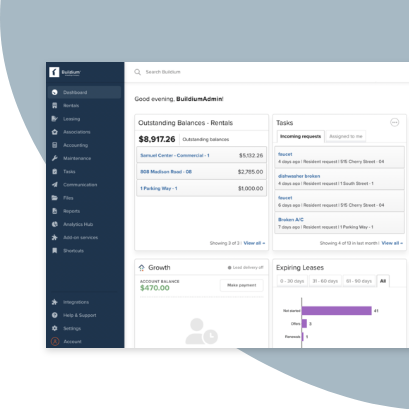
TurboTenant focuses on self-managing landlords who want affordable tools for their own properties. Buildium is built for property management companies managing rentals and associations, with more extensive accounting and owner management capabilities.
| Feature | TurboTenant | Buildium |
|---|---|---|
| Starting Price | Free plan with basic features; Essentials from $149/year | From $62/month |
| Free Trial | None (Free plan available) | 14-day free trial, no credit card required |
| Best For | Independent landlords | Property management companies |
| Accounting | Rental bookkeeping; Schedule E and Form 8825 reporting on Pro | Property accounting, bank reconciliation, and financial reporting on all plans |
| Owner Management | Dedicated owner portal not listed | Owner portal and reporting on all plans |
| Automation | Rent reminders and leasing workflows | Resident payment reminders and returned-payment workflows; advanced Workflow Automations on Growth and Premium |
| Integrations | No public integration marketplace or open API advertised | Buildium Marketplace; Open API on Premium |
| AI Tools | AI-generated listing descriptions and renters insurance document scanning | Write with AI on all plans; Extensive AI agents that target time-consuming workflows included on Premium and available as an add-on |
Where TurboTenant Stands Out
TurboTenant’s biggest advantage is accessibility. Landlords can get started without paying a subscription and add features when their needs change.
A few other benefits stand out:
- Free rental management tools: Listings, screening, rent collection, and maintenance requests are available without a paid plan.
- Low annual pricing: Paid plans start at $149 per year for portfolios of up to 10 units.
- Leasing-focused workflows: Owners can manage rental advertising, inquiries, and showings from one account.
- Tax reporting on Pro: Schedule E and Form 8825 reports help landlords organize rental finances for tax preparation.
Where Buildium Stands Out
Buildium is designed for companies managing properties on behalf of clients. Its accounting and owner-facing tools support the financial responsibilities that come with those relationships.
Other differences include:
- Owner reporting: The Owner Portal gives clients access to financial information, documents, and contributions.
- Property accounting: Bank reconciliation, financial reporting, and 1099 e-Filing support more involved accounting workflows.
- Team coordination: Staff permissions, task management, and maintenance work orders help teams organize responsibilities.
- AI and automation: Time-saving AI supports writing and operational tasks, with more advanced capabilities on Premium or available as add-ons.
- Integrations: Buildium Marketplace connects specialized tools, while Premium includes Open API access.
For independent landlords, TurboTenant’s free plan may cover enough of the work. Property management companies that need owner reporting and more advanced financial controls will likely find Buildium a closer fit.
TurboTenant Features That Matter Most
TurboTenant covers the main steps involved in managing a rental property, from advertising a vacancy to collecting rent. Some capabilities are free, while others require Essentials or Pro.
- Rental marketing and listing syndication: TurboTenant supports unlimited property listings and distributes them to rental listing sites. Lead management and showing scheduling keep inquiries organized. Some Capterra reviewers report losing Zillow syndication, so confirm the current distribution partners if that site matters to you.
- Applications and tenant screening: Applicants can complete online rental applications and authorize screening. Pre-screening questions help landlords identify potential mismatches before scheduling tours. Pro adds income and employer verification, along with fraud detection tools.
- Lease management: Essentials and Pro include unlimited lease agreements, addendums, and eSignatures. Free users don’t get these tools included, although TurboTenant lists its Landlord Forms Pack as a separate $199 purchase.
- Online rent collection: Tenants can pay rent online, with payment reminders and tracking available to landlords. Paid subscriptions advertise faster payouts, although actual deposit timing may vary.
- Accounting and tax reports: TurboTenant offers income and expense tracking, with Schedule E and Form 8825 reports on Pro. That tier also includes automated transaction imports and unlimited connected bank accounts.
- Maintenance requests: Residents can submit repair requests through the platform, and landlords can track them in their account. Companies needing more involved vendor assignments or work order management should check whether its maintenance tools support their process.
TurboTenant Pricing
TurboTenant offers a free software plan and two paid subscriptions. It also has a separate full-service property management option called Autopilot.
Essentials and Pro are billed annually, not month to month. Their advertised prices are starting rates, with the annual total increasing based on the number of units you manage.
Free
$0/month
The Free plan includes rental listings, applications, screening, online rent collection, and maintenance requests.
It’s a reasonable starting point for landlords who handle leasing themselves and don’t need included eSignature tools or advanced accounting reports.
Essentials
Starting at $149/year ($12.42/month equivalent)
Essentials adds unlimited lease agreements, addendums, and eSignatures. It also includes faster rent payouts, priority listing review, and additional document tools.
This tier fits owners who want to keep the leasing process in one platform without upgrading to TurboTenant’s full accounting feature set.
Pro
Starting at $199/year (approximately $16.58/month equivalent)
Pro adds income and employer verification, fraud detection, and more advanced accounting capabilities. Those include an insights dashboard, Schedule E and Form 8825 reports, automated transaction imports, and unlimited connected bank accounts.
Pro also includes phone support and Admin and Assistant team roles.
Autopilot
Separate service pricing
TurboTenant’s Autopilot offering is a managed service rather than another standard software subscription. It covers tenant placement and ongoing rental management services, with separate fees.
Check TurboTenant’s current pricing for details.
How Portfolio Size Affects Pricing
TurboTenant’s published annual rates vary by unit count.
| Units Managed | Essentials | Pro |
|---|---|---|
| 1–10 | $149/year | $199/year |
| 11–30 | $199/year | $399/year |
| 31–60 | $299/year | $699/year |
| 61+ | $349/year | $999/year |
Five units fall into the lowest pricing bracket. At 40 units, Essentials costs $299 per year and Pro costs $699 per year.
Pricing Takeaway: TurboTenant is affordable for landlords who need leasing and rent collection, particularly on its Free plan. Pro adds more advanced financial tools, but the annual cost rises with portfolio size. Compare the plan features and any payment or screening fees before choosing a tier.
Final Takeaways: TurboTenant Pros and Cons
Pros
- Free plan: Landlords can advertise rentals, screen applicants, and collect rent without a subscription.
- Accessible leasing tools: Listing management, applications, and showings are available in one platform.
- Online leases: Essentials and Pro include unlimited lease agreements and eSignatures.
- Tax reporting: Pro includes reports for Schedule E and Form 8825.
- Positive ease-of-use feedback: G2 and Capterra reviewers frequently mention straightforward setup and rental management.
Cons
- Rent payment timing: Some reviewers report deposits taking several days to arrive.
- Support access: Phone support is reserved for Pro, and reviewers describe mixed experiences with response times.
- Plan limitations: More advanced accounting features require a higher-priced subscription.
- Owner management gaps: Dedicated owner statements and trust accounting aren’t listed in the self-management plans.
- Mobile functionality: Some G2 reviewers report that the app has fewer capabilities than the desktop platform.
Choosing the Right Property Management Software for Your Portfolio
TurboTenant can be a good choice if you manage your own rentals and want affordable leasing tools. The main question is whether those tools cover the work you do most often.
Before you commit, consider a few things:
- Your accounting needs: Do you mainly track income and expenses for your own properties, or do you manage funds and reports for clients?
- Your daily workflows: Can the platform handle repairs and tenant communication the way you work now?
- Your portfolio size: How will subscription costs change as you add units?
- Your support needs: Which channels can you access when a payment or leasing issue needs attention?
For property management companies handling rentals on behalf of multiple owners, Buildium brings property accounting, owner reporting, and maintenance management into one platform. Its automation and customization options also give teams more ways to organize work as they grow.
If you want to see whether Buildium is a better fit for your portfolio, you can start a 14-day free trial or schedule a guided demo with a product specialist.
Our Methodology
We reviewed TurboTenant’s published features and pricing, along with customer feedback from G2, Capterra, Trustpilot, and TrustRadius, as of November, 2026.
We looked for recurring themes across positive and negative reviews rather than relying on individual complaints. The review excerpts represent experiences described on the source platforms. Ratings and review counts reflect the figures recorded during research and may change over time.
TrustRadius had no published TurboTenant reviews or overall rating at the time of research. Buildium comparisons are based on its published pricing and feature information.
TurboTenant Review Frequently Asked Questions
Is TurboTenant Free?
Yes. TurboTenant offers a Free plan with no time limit. It includes rental listings, applications, tenant screening, online rent collection, and maintenance requests.
Essentials and Pro are paid annual subscriptions that add more leasing and accounting features.
Is TurboTenant Legit and Safe to Use?
TurboTenant is an established rental management platform with published security measures that include data encryption, automated security checks, and fraud monitoring. It uses Stripe to process online rent payments and TransUnion for applicant screening.
As with any platform handling personal and financial information, review TurboTenant’s security practices and privacy terms before signing up.
Does TurboTenant Report to the IRS?
TurboTenant uses Stripe to process online rent payments. When payments meet applicable federal or state reporting requirements, Stripe issues Form 1099-K and files it with the IRS. Eligible landlords can access their forms through TurboTenant.
This is separate from TurboTenant’s Schedule E and Form 8825 reports, which help landlords organize rental income and expenses for tax preparation. Check with a qualified tax professional about the reporting requirements that apply to your rental income.
Does TurboTenant Include Accounting?
Yes. TurboTenant offers rental bookkeeping, with more advanced accounting features on Pro. These include automated bank transaction imports and tax-ready reports.
Property management companies needing owner statements or trust accounting should confirm whether the platform supports those workflows.
Is TurboTenant Good for Property Management Companies?
TurboTenant can work for smaller rental operations, particularly when the manager handles properties directly. Its published plans, however, are geared primarily toward self-managing landlords.
Companies responsible for multiple owners may find software with dedicated owner reporting and more extensive financial controls a better fit.
Buildium's Commitment to Safe and Secure AI
At Buildium, we believe AI should be a trusted extension of our platform, with people remaining responsible for decisions that require their judgment. Our approach is grounded in transparency, education, and strong security standards.
We focus on using AI to reduce repetitive work while maintaining human oversight. Buildium AI is designed to support property managers who value efficiency, security, and trust. We continue to develop these capabilities responsibly.