

Setting up and maintaining a property management chart of accounts is one of the most important accounting practices in your business. It helps you track every transaction for each property in your portfolio, so you always know how each one is performing.
Chart of Accounts
Want clearer, cleaner books? What about a more useful view into your properties or just easier accounting in general?
Get the GuideThis article walks through how to set up a chart of accounts for your rental properties, plus the best practices that keep it accurate, with help from Taylor Brugna, Partner at The Real Estate CPA. You can even download our free resource above to get started.
In this article we’ll cover:
- What a property management chart of accounts is and the five account categories it uses
- How to set one up with a numbering system that leaves room to grow
- Choosing between a spreadsheet, QuickBooks, or property management software
- Best practices that keep your chart of accounts accurate
What Is a Property Management Chart of Accounts?
A property management chart of accounts is a structured list of every financial account you use to record transactions for the properties you manage, organized into categories. Those categories give you and your owners a clear view of the data behind each property’s performance.
Every transaction falls under one of five overarching categories: assets, liabilities, expenses, income, or equity. Each property gets its own coding system within your chart of accounts.
“Having a clear, concise chart of accounts is crucial for your clients to understand how their rental properties are performing,” says Brugna. “It can guide future investments and help both you and your clients make important financial decisions.”
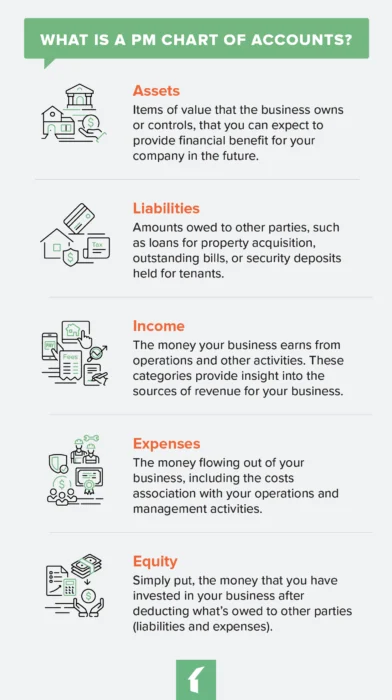
Assets
- Definition: Items of value that the business owns or controls, that you can expect to give your company financial benefit in the future. This includes properties that may be eligible for tax advantages such as the bonus depreciation deduction, which the One Big Beautiful Bill Act made a permanent 100% deduction for qualifying property acquired after January 19, 2025.
- Example Categories: Checking accounts, savings accounts, and accumulated depreciation of each property
Liabilities
- Definition: Amounts owed to other parties, such as loans for property acquisition, outstanding bills, or security deposits held for tenants
- Example Categories: refundable security deposits, credit card balances, and taxes/insurance owed on properties.
Income
- Definition: The money your business earns from operations and other activities. These categories show your sources of revenue, and recording them correctly matters for accurate tax reporting.
- Example Categories: Management fees, onboarding fees, leasing fees, late payment fees, maintenance markups.
Note: the IRS states that advance rent payments, such as for a lease’s final year, must be included in your rental income in the year they are received.
Expenses
- Definition: The money flowing out of your business, including the costs associated with your operations and management activities. This can include vehicle expenses, for which the IRS sets a standard mileage rate. Categorizing these expenses correctly matters for accurate tax reporting.
- Example Categories: overhead, payroll, insurance and licensing, contractor fees, service fees, legal fees
Equity
- Definition: The money that you have invested in your business after deducting what’s owed to other parties (liabilities and expenses)
- Example Categories: net income, retained earnings, and any contributions or distributions made for your properties
The codes can get granular, but that’s a good thing. By giving each transaction a specific code, you can track where every penny goes and which properties are profitable.
Key account examples:
- Assets: Checking accounts, savings accounts, accumulated property depreciation
- Liabilities: Security deposits, credit card balances, taxes and insurance payable
- Equity: Net income, retained earnings, property contributions and distributions
Why Do You Need a Chart of Accounts for Your Property Management Company?
A property management chart of accounts is the backbone of all the financial reports and forecasting you do for both your company and your properties. It allows you to:
- Report the financial health of rental properties to owners
- Determine rent and fee increases
- Forecast marketing, staffing, and other budgets
- Report accurate financials for taxes
How to Set Up a Chart of Accounts for Your Property Management Portfolio
You set up a property management chart of accounts as a hierarchy of entries, much like a parent-child structure. The highest-level entries are the five categories above, and each of your transactions groups underneath them as a “child.”
Step 1: Assign Parent Category Codes
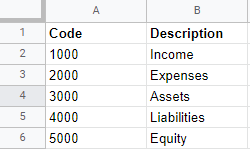
Many experts recommend numbering line items in ranges of 1,000. For example, assets get the high-level number 1000, and all assets are coded between 1000 and 1999. According to Brugna, a typical numbering system is organized as follows:
| Parent Category | Code Range |
|---|---|
| Assets | 1000-1999 |
| Liabilities | 2000-2999 |
| Shareholder’s Equity | 3000-3999 |
| Revenue | 4000-4999 |
| Expenses | 5000-5999 |
Key point: Numbering in ranges of 1,000 leaves room to add new accounts under each category without reworking your system later.
Step 2: Assign Child Category Codes
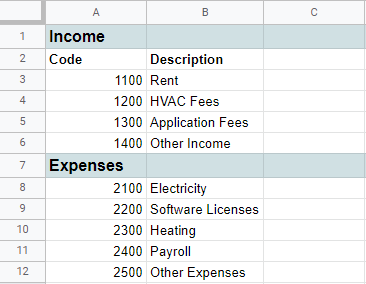
Under that, you can assign different types of income their own numbers. For example, 1100 might be rent, while 1200 could be HVAC maintenance fees.
Step 3: Assign Property Codes
Finally, you’ll need a way to identify which income comes from which property, while leaving room to add future properties.
To do that, assign each property a number in the 1s place of your accounts. So, your property at 123 Elm St. would be assigned 1101 for rent and 1201 for HVAC fees. For other accounts, it would still be assigned a one in the 1s place.
To keep line items straight, make sure each has a clear and brief summary.
Property Management Chart of Accounts Examples
Let’s take a look at how the above example would look on a spreadsheet.
At the highest level, your chart of accounts will look something like this:
Under those high-level categories, you would then fill in each line-item description:
Finally, transactions for each property would be recorded using codes based on the descriptions you already set up:
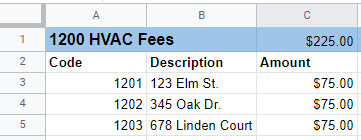
Built in a simple spreadsheet, a chart of accounts can take some time to set up. You’ll have to track down every transaction that goes through your property management firm, create a coding system that works best for your company, and then set up the sheets. Still, putting in the time to create a consistent method that makes adding new transactions easy is worth it.
If the idea of updating a spreadsheet is unappealing, there are, of course, software solutions that automate accounting processes and keep your books much more secure than a spreadsheet ever would.
QuickBooks for a Property Management Chart of Accounts
QuickBooks probably comes to mind for your own business’ financials. It includes templates that work for most businesses. If you’re using a property management software solution with an open API, you can integrate QuickBooks directly into that tool.
However, QuickBooks isn’t purpose-built for property managers, so you may end up spending more time setting up a chart of accounts and accounting system that doesn’t capture all the intricacies of your leasing, vendor management, and other operations accurately or reliably.
Keep in mind, too, that QuickBooks auto-populates their charts of accounts and works best for your internal company financials rather than accounting for the properties you manage. You may have to spend some time tweaking it to meet the needs of a property management company.
Our comparison of QuickBooks and Buildium breaks down where each option works best.
Using Buildium for a Property Management Chart of Accounts
For the accounting on your owners’ properties, a strong property management solution has accounting tools built right in, with templates already configured for those needs. Buildium comes with a standard chart of accounts for rental properties, plus the option to edit an existing general ledger account.
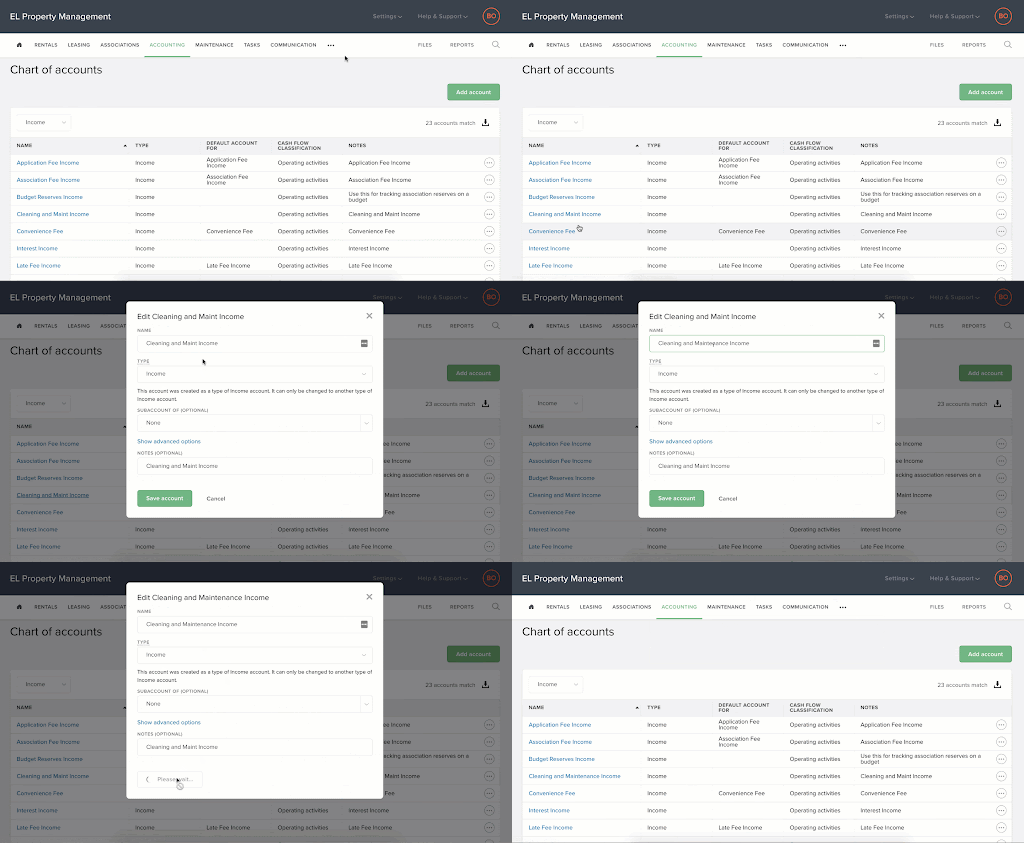
Using Buildium, you can set up accounting to record every transaction at the unit level. This is especially helpful for larger properties that contain multiple units. There are a few important benefits to this level of detail in your chart of accounts:
- You’ll be able to monitor the financial health of every lease within each of your properties.
- Transactions tied to specific units show up on different types of payments, such as rent deposit checks, printed checks, and EFT payments.
- Buildium shows a more granular breakdown of management fees by unit.
- You can create and share individual reports or report batches, including Income Statements, Rental Owner Statements, and General Ledger Consolidation Reports, all with unit-level details.
Want to see these features in action? You can schedule a guided demo to see how Buildium handles accounting for the properties you manage.
Property Management Chart of Accounts Best Practices
Once you get your chart of accounts up and running, set up a training session with stakeholders, explaining the coding system. Teach them to adhere to the following best practices, as well.
#1: Designate One Person to Update the Property Management Chart of Accounts
A property management chart of accounts is definitely a cooks-in-the-kitchen situation. Too many people accessing the file will only cause mistakes and chaos. By too many, we mean more than one.
#2: Update Frequently and Consistently
Get your team on a regular schedule of reporting transactions to you or the person responsible for the property management chart of accounts. Give them a deadline to get all of their transactions in. That way, there’s time to update and reconcile by the end of the month.
#3: Stick to Your Coding System
Of course, you will have to add new line items for new transactions, but each new item should be sorted into existing categories that follow the coding system you set up.
“Consistency in categorizing will help your property owners identify trends, areas of success, and where to improve,” says Brugna. “For example, monitoring repairs and maintenance costs month over month will give you a clear breakdown of expenses and show you how renovation budgets are tracking.”
#4: Record Absolutely Everything
Don’t keep anything off the books, or even in a separate chart of accounts. Record every single transaction in the same place. The IRS also expects businesses to keep complete financial records that support what you report. Taxes, compliance, property forecasting, and investment decisions all depend on a complete picture of your properties’ finances.
#5: Keep the Miscellaneous Items to a Minimum
If you’ve ever moved, you know you always end up with that one box of miscellaneous stuff you don’t know what to do with. When you unpack it, you’re left with a mess of random things to deal with.
The same goes for your property management chart of accounts. While you may have some miscellaneous income or expenses, you shouldn’t use that category as a catch-all for transactions you just don’t want to deal with at the moment. You’ll end up with a mess that will be tough to reconcile at the end of the month, quarter, or year.
Set Up and Maintain Your Chart of Accounts with Ease
A chart of accounts is a tool every property management business needs. Whether you keep a spreadsheet, use a general program such as QuickBooks, or choose specialized accounting tools from a property management software solution, pick the method and the system that works best for you and stick to it.
Want more insights to deepen your understanding of the Chart of Accounts? Check out our step-by-step resource, Setting Up an Effective Chart of Accounts. It even includes a template to help you get started.
To learn more about Buildium’s accounting tools, sign up for a 14-day free trial, no credit card required, or schedule a demo.
Frequently Asked Questions About Property Management Chart of Accounts
Is There a Free Property Management Chart of Accounts Template?
Yes. The step-by-step resource linked above, Setting Up an Effective Chart of Accounts, includes a template to help you get started.
How Is a Property Management Chart of Accounts Different from a General Business One?
It’s built for property-specific accounts such as rental income, security deposits, and per-property tracking, which general business accounting doesn’t require.
Can I Customize My Chart of Accounts in Property Management Software?
Yes. Platforms such as Buildium come with a standard, industry-specific chart of accounts, and you can add, edit, or deactivate accounts so the structure matches how you operate and report to owners.
Can I Use QuickBooks for a Property Management Chart of Accounts?
You can, though QuickBooks works best for your internal company financials and takes some tweaking to fit the properties you manage.
Read more on Accounting & Reporting