One of the most important accounting practices in any business is setting up and keeping a property management chart of accounts. As a property manager, your chart of accounts will help you keep tabs on every transaction for each of your properties in your portfolio.
Chart of Accounts
Want clearer, cleaner books? What about a more useful view into your properties or just easier accounting in general?
Get the Guide“Having a clear, concise chart of accounts is crucial for your clients to understand how their rental properties are performing,” says Taylor Brugna, Partner at The Real Estate CPA. “It can guide future investments and help both you and your clients make important financial decisions.”
In this article, we’ll walk through setting up a chart of accounts for your rental properties and discuss some best practices, with the help of Brugna. You can even download our free guide above to get started.
What Is a Property Management Chart of Accounts?
Brugna describes a property management chart of accounts as a record that organizes each transaction made for your properties into accounting categories. These categories offer a clear understanding of data relevant to each property. Transactions fall under one of five overarching categories: assets, liabilities, expenses, income, or equity. Each property gets its own coding system within your chart of accounts. Put together, all of those accounts become your chart of accounts.
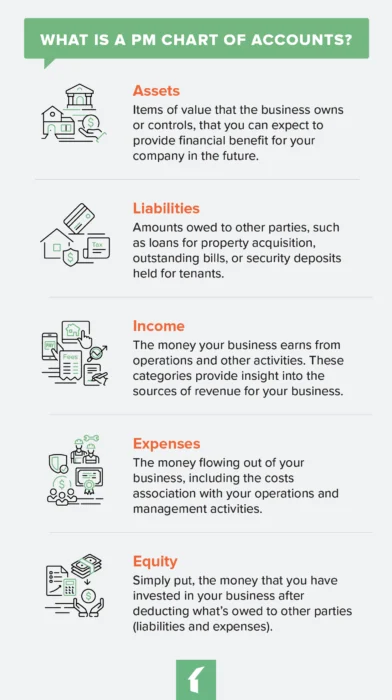
Assets
- Definition: Items of value that the business owns or controls, that you can expect to provide financial benefit for your company in the future, such as properties that may be eligible for tax advantages like the bonus depreciation deduction, which has been reset to 100% under the One Big Beautiful Bill Act.
- Examples: Checking accounts, savings accounts, and accumulated depreciation of each property
Liabilities
- Definition: Amounts owed to other parties, such as loans for property acquisition, outstanding bills, or security deposits held for tenants
- Example Categories: refundable security deposits, credit card balances, and taxes/insurance owed on properties.
Income
- Definition: The money your business earns from operations and other activities. These categories provide insight into the sources of revenue for your business, and it is important to record them correctly for tax purposes. For example, the IRS states that advance rent payments, like for a lease’s final year, must be included in your rental income in the year they are received.
- Example Categories: Management fees, onboarding fees, leasing fees, late payment fees, maintenance markups
Expenses
- Definition: The money flowing out of your business, including the costs association with your operations and management activities. This can include vehicle expenses, for which the IRS set the 2024 standard mileage rate at 67 cents per mile.
- Example categories: overhead, payroll, insurance and licensing, contractor fees, service fees, legal fees
Equity
- Definition:Simply put, the money that you have invested in your business after deducting what’s owed to other parties (liabilities and expenses)
- Example categories: net income, retained earnings, and any contributions or distributions made for your properties
The codes can get pretty granular, but that’s a good thing. By giving each transaction a specific code, you can easily track where every penny goes and which properties are profitable.
Key account examples:
- Assets: Checking accounts, savings accounts, accumulated property depreciation
- Liabilities: Security deposits, credit card balances, taxes and insurance payable
- Equity: Net income, retained earnings, property contributions and distributions
Why Do You Need a Chart of Accounts for Your Property Management Company?
In the days before computers, each transaction had its own page in a ledger book, recording income, expenses, assets, liabilities, and equity. Transactions were recorded and, at the bottom of the page, the numbers were tallied. To get a total picture of profits and losses, an accountant simply had to add up income, assets, and equity, and then subtract expenses and liabilities.
A property management chart of accounts is the backbone of all the financial reports and forecasting you do for both your company and your properties. It allows you to:
- Report the financial health of rental properties to owners
- Determine rent and fee increases
- Forecast marketing, staffing, and other budgets
- Report accurate financials for taxes
How to Set Up a Chart of Accounts for Your Property Management Portfolio
A chart of accounts for property management is set up in a hierarchy of entries. You might even think of it in terms of a parent-child organization. The highest-level entries would be the five we discussed above. Then, each of your transactions would be grouped as “children” underneath.
Step 1: Assign Parent Category Codes
Many experts recommend numbering line items using ranges of 1,000. For example, assets would be assigned the high-level number 1000, and all assets would be coded between 1000 and 1999. According to Brugna, a typical numbering system would be organized as follows:
- Assets: 1000-1999
- Liabilities: 2000-2999
- Shareholder’s Equity: 3000-3999
- Revenue: 4000-4999
- Expenses: 5000-5999
Step 2: Assign Child Category Codes
Under that, you can assign different types of income their own numbers. For example, 1100 might be rent, while 1200 could be HVAC maintenance fees.
Step 3: Assign Property Codes
Finally, you’ll need a way to identify which income comes from which property, while leaving room to add future properties.
To do that, assign each property a number in the 1s place of your accounts. So, your property at 123 Elm St. would be assigned 1101 for rent and 1201 for HVAC fees. For other accounts, it would still be assigned a one in the 1s place.
To keep line items straight, make sure each has a clear and brief summary.
Property Management Chart of Accounts Examples
Let’s take a look at how the above example would look on a spreadsheet.
At the highest level, you chart of accounts will look something like this:
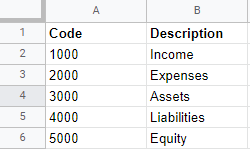
Under those high-level categories, you would then fill in each line item description:
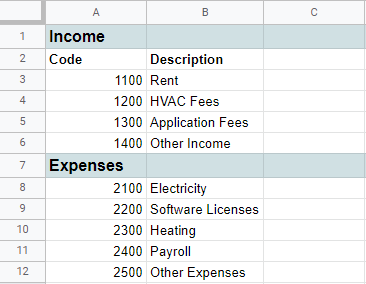
Finally, transactions for each property would be recorded using codes based on the descriptions you already set up:
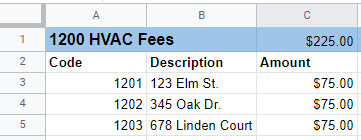
If done using a simple spreadsheet, a chart of accounts can take some time to set up. You’ll have to track down every transaction that goes through your property management firm, create a coding system that works best for your company, and then set up the sheets. Putting in the time to create a consistent accounting method that makes adding new transactions easy, however, is well worth it.
If the idea of updating a spreadsheet is unappealing, there are, of course, software solutions that automate accounting processes and keep your books much more secure than a spreadsheet ever would.
Quickbooks for a Property Management Chart of Accounts
Quickbooks probably comes to mind for your own business’ financials. This flexible software includes templates that work for most businesses, and it can be integrated with other tools. If you’re using a property management software solution with an open API, you can integrate QuickBooks directly into that tool.
It’s important to keep in mind, however, that QuickBooks auto-populates their charts of accounts and is best suited for your internal company financials versus accounting for the properties you manage. You may have to spend some time tweaking it to meet the needs of a property management company.
Using Buildium for a Property Management Chart of Accounts
When it comes to handling the accounting for your owners’ properties, a solid property management solution, however, will have accounting tools built right in, with templates that are already configured for those needs. Buildium comes with a standard chart of accounts for rental properties along with the option to edit an existing general ledger account.
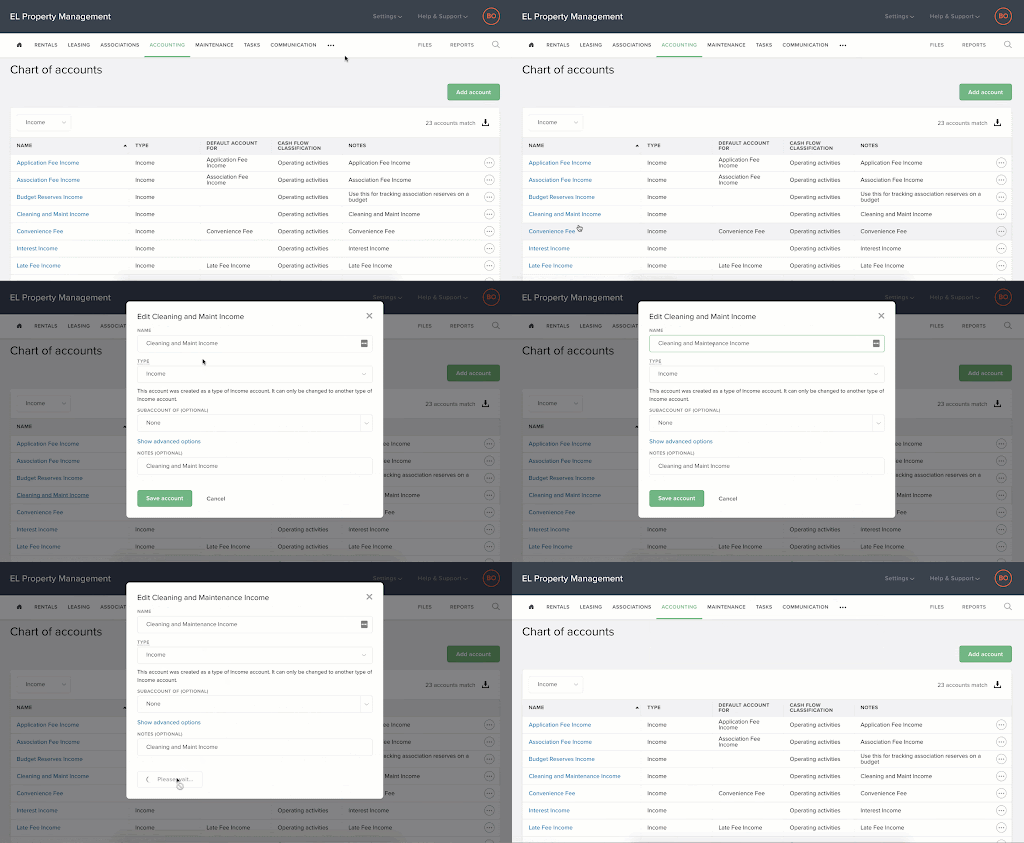
The chart of accounts view inside of Buildium’s property management software.
Using Buildium, you can set up accounting to record every transaction at the unit level. This is particularly helpful for properties with larger properties that contain multiple units. There are a few important benefits to having this level of detail in your chart of accounts:
- You’ll be able to monitor the financial health of every lease within each of your properties.
- Transactions tied to specific units are automatically reflected on different types of payments, such as rent deposit check, printed checks, and EFT payments.
- Buildium shows a more granular breakdown of management fees by unit.
- You can create and share individual reports or report batches, including Income Statements, Rental Owner Statements, and General Ledger Consolidation Reports, all with unit-level details.
Want to see these features in action? You can schedule a guided demo to learn more about how Buildium can streamline your property management accounting.
Property Management Chart of Accounts Best Practices
Once you get your chart of accounts up and running, set up a training session with stakeholders, explaining the coding system. Teach them to adhere to the following best practices, as well.
#1: Designate One Person to Update the Property Management Chart of Accounts
A property management chart of accounts is definitely a cooks-in-the-kitchen situation. Too many people accessing the file will only cause mistakes and chaos—and by too many, we mean more than one.
#2: Update Frequently and Consistently
Get your team on a regular schedule of reporting transactions to you or the person responsible for the property management chart of accounts. Give them a deadline to get all of their transactions in. That way, there’s time to update and reconcile by the end of the month.
#3: Stick to Your Coding System
Of course, you will have to add new line items for new transactions, but each new item should be sorted into existing categories that follow the coding system you set up.
“Consistency in categorizing will help your property owners identify trends, areas of success, and where to improve,” says Brugna. “For example, monitoring repairs and maintenance costs month over month will give you a clear breakdown of expenses and show you how renovation budgets are tracking.”
#4: Record Absolutely Everything
Don’t keep anything off the books, or even in a separate chart of accounts. Record every single transaction in the same place. Taxes, compliance, property forecasting, and investment decisions all depend on a complete picture of your properties’ finances.
#5: Keep the Miscellaneous Items to a Minimum
If you’ve ever moved, you know you always end up with that one box of miscellaneous stuff you don’t know what to do with. When you unpack it, you’re left with a mess of random things to deal with.
The same goes for your property management chart of accounts. While you may have some miscellaneous income or expenses, you shouldn’t use that category as a catch-all for transactions you just don’t want to deal with at the moment. You’ll end up with a mess that will be tough to reconcile at the end of the month, quarter, or year.
Set Up and Maintain Your Chart of Accounts with Ease
A chart of accounts is a must-have tool for any successful property management business. Whether you keep a spreadsheet, use a one-size-fits-all program such as Quickbooks, or opt for specialized accounting tools from a property management software solution, choose the method and the system that works best for you and stick to it.
Want more insights to deepen your understanding of the Chart of Accounts? Check out our step-by-step guide, Setting Up an Effective Chart of Accounts. It even includes a template to help you get started.
For a more in-depth look at a property management chart of accounts, you can check out the on-demand video below for an idea of how property managers can use technology to help, as well.
To learn more about Buildium’s accounting tools, sign up for a 14-day free trial, no credit card required, or schedule a demo.
Frequently Asked Questions About Property Management Chart of Accounts
What is a chart of accounts?
A chart of accounts is a list of all the financial accounts used by a property management business. It organizes revenues, expenses, assets, and liabilities, helping you keep track of financial transactions and understand your business’s financial health.
Why is a chart of accounts important for property management?
A well-organized chart of accounts helps property managers categorize and record financial transactions accurately. This practice simplifies financial reporting, aids in budgeting, and allows for better financial analysis, making it easier to manage properties efficiently.
How do I start setting up a chart of accounts?
Begin by listing all the accounts you need, grouped into categories such as income, expenses, assets, and liabilities. Be specific and detailed, including accounts for rent, maintenance costs, utilities, and property taxes. Use accounting software such as Buildium, if possible, to streamline the process.
What are the five main types of accounts in a property management chart of accounts?
The five main account types are Assets (what the business owns, like bank accounts), Liabilities (what is owed, like security deposits), Equity (the net worth of the business), Income (revenue from rent and fees), and Expenses (costs of operation, such as repairs and utilities).
How is a property management chart of accounts different from a general business one?
It’s specialized for property-specific accounts like rental income, security deposits, and per-property tracking—features that general business accounting doesn’t require.
Can I customize my chart of accounts in property management software?
Yes. While platforms such as Buildium come with a standard, industry-specific chart of accounts to get you started, you can customize it to fit your business. You can add, edit, or deactivate accounts to make sure the structure perfectly matches how you operate and report to owners.
Review it annually and whenever your business changes, such as adding new property types or services.
Read more on Accounting & Reporting